

Track Your Spending
And, here's a simple way to do it...

Do you want to have clarity on the state of your personal finances? (Who wouldn’t?) If so, the most important number to know is your total monthly spending.
Why?
Well, life sometimes comes at you pretty quickly. Perhaps you want to:
buy a house
have a kid
pay for college
change jobs
get a dog
retire
Before doing any of these things, you should know how much your cash flow will change before you make a final decision. If not, you may be in for an unwelcome surprise. But, in order to know how your cash flow will change, you need to know what it is now.
Most of us don’t have great visibility into our spending and those of us who think we do, often underestimate it. Trust me on this.
How should you track spending?
I recommend a simple framework to track your monthly spending. It requires no apps, no categories, and no accounting degree.
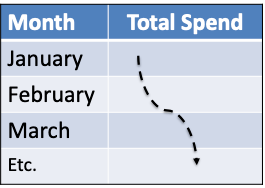
As I’m fond of saying, create the world’s simplest spreadsheet — one column is the date and another column is your total monthly spending. Each row is a new month. If spreadsheets don’t bring you joy, use a pad and pencil.
It looks like this:
Some Details
For most people, all your spending flows through your checking account. Conveniently, most bank account statements provide a summarized tally of all the outflows for the month — paper checks, online bill pay, ATM withdrawals, debit swipes, venmo and Zelle payments, transfers, etc. With a few possible adjustments, just track that total outflow each month as that’s your spending.
Banks use different terminology but they usually call it withdrawals, debits, or subtractions. Find that number on your statement and use it.
However, a few things may show up as withdrawals that are not spending in the way I think of it and you should adjust for those. The most common are:
Income tax payments — they’re related to your income
Business expenses — they’re related to your work and are not personal spending
Transfers to savings — obviously, this isn’t spending but they show up as withdrawals on your bank statement
Reimbursements — you paid for something for which you’ll be partially or fully reimbursed such as health care or dinner with a friend who’s going to Venmo you half the cost, etc.
Once you have the adjusted number:
enter it into your version of the world’s simplest spreadsheet
don’t fret if you don’t adjust for every last penny
repeat every month
you’ll have clarity on what you really spend
A few other considerations
Your bank statement is probably not tied to the end of the calendar month; that’s OK. Use the bank statement date and not the calendar month as your bank statement is the final arbiter of what you spent.
This isn’t as accurate if you carry a credit card balance and do not pay it in full each month as your full spending may not be reflected in what you paid.
If you receive payments in Venmo, do not keep a running balance in it. Instead, always empty Venmo so that when you make payments, they come directly from your checking account. Otherwise, you’ll miss this spending in the tally for the month.
Don’t bother to categorize anything. It takes more time and adds little or no value. Keep it simple and just tally the total.
Your monthly spending will fluctuate and be seasonal. Don’t fret about short term ups and downs as you want to get a trend over a year or more.
Don’t fool yourself by excluding expenses that you regret or will never do again. Just count it all and if helpful, add a third column called “Notes” where you can comment about where you went awry that month.
Where will this get you?
As some wise person once quipped, “If you don’t know where you’re going, any road will get you there.” With clarity on your spending, you’ll know what is financially doable and how your financial future may unfold, especially when it comes to planning for retirement.
In a future note, I’ll explain how to track your net worth and how they relate to each other.
Thank you Jimmy for an excellent weekly on how to track spending....I hope to see you sometime this summer!
Candy
It costs 10 bucks a month, but Rocket Money is a great way to set up a budget and track your spending. I use the notes app on my phone to keep track of miscellaneous cash expenses.